A live TUI in the AI era
The best AI tools ship terminal UIs, and suddenly everyone wants one. What .NET offers (Spectre.Console, praised and then audited), what Ink and Bubble Tea do differently, why Go keeps winning this niche — and the pattern I actually ship: a Go TUI attached to a .NET backend over SSE, with a working example.
Somewhere around 2025, the most advanced software interface on your machine quietly became… a terminal app. Claude Code, opencode, gemini-cli, codex — the AI tools everyone actually uses all ship as TUIs: live panes, streaming transcripts, spinners, modals, keyboard everything. Not a web dashboard in sight. The web spent fifteen years teaching us that serious UI means a browser; the agent era spent about six months un-teaching it.
The reasons are practical, not aesthetic — though the aesthetic isn’t hurting. A TUI runs where the work is: inside the SSH session, the container, the repo. It has no port to forward, no build pipeline for its front end, no login page. It starts in milliseconds, streams by nature, and puts your hands where a developer’s hands already are.
So: you’re sold, and you want one for your own tool — live, interactive, the works. I’ve now built this twice — once in C#, once in Go, for the same system, my agent orchestrator — which qualifies me to give you the tour with receipts. It ends with the combination I actually ship, and a running example you can attach to.
What .NET gives you: Spectre.Console, honestly#
If you live in .NET, the answer to “how do I make my console output not look
like 1997” is Spectre.Console, and it deserves its reputation. Tables,
trees, panels, progress bars, prompts, markup like
[green]pass[/] — output that looks designed with almost no effort. And for
live dashboards it has Live rendering and a Layout system:
var layout = new Layout("root").SplitRows(
    new Layout("header").Size(5),
    new Layout("body"),
    new Layout("footer").Size(3));

await AnsiConsole.Live(layout).StartAsync(async ctx =>
{
    while (running)
    {
        layout["body"].Update(RenderTranscript());
        ctx.Refresh();
        await Task.Delay(100);
    }
});
Conductor’s built-in dashboard is exactly this, and it’s genuinely good: a full-screen live view with a stage sidebar, a streaming transcript, gate timers, pop-out modals for thinking/output/git. Spectre rendered all of it without complaint. If your TUI is a dashboard with occasional keys, stop reading, use Spectre, be happy.
Now the audit. Because the moment your TUI becomes an application — focus, modals, scrolling, editing — you discover what Spectre is not. Spectre is a rendering library, not an application framework:
- No component model. A panel doesn’t own state or handle input; it’s a thing you draw. Composition means functions that return renderables, and every piece of interactivity lives somewhere else, by hand.
- No input system. There’s no event loop, no focus, no “the modal has
the keyboard now”. Conductor’s dashboard hand-rolls it: a
ConcurrentQueue<ControlAction>fed by a raw key-reader thread, aModalenum, manual scroll offsets, and a lock around the buffers so the UI thread is the only reader. It works — but I wrote a tiny, bespoke, undocumented UI framework and buried it in a dashboard class, which is exactly the code smell it sounds like. - No reactivity. You poll and redraw on a timer, or you build your own invalidation. Ten-line demos redraw everything at 10 Hz and shrug; fuller screens start to shear and flicker if you’re careless.
There is a retained-mode alternative — Terminal.Gui, an honest widget toolkit with focus and events. But its native aesthetic is dialogs, menus and text fields: a Turbo Vision descendant, forms-first, while the thing the AI era wants is a live streaming dashboard with vim keys. You can bend it there; you’ll be bending.
So .NET’s real position: superb drawing, bring-your-own-architecture. Which raises the question — what are the tools that nailed the live TUI using?
How the AI tools actually do it#
Two answers dominate, and neither is a coincidence.
Ink — React for the terminal, and the machinery under Claude Code.
Components, props, hooks, and a flexbox layout engine (Yoga) targeting
character cells. If you know React you already know Ink; useState +
useEffect on a streaming API and the transcript renders itself. The
snapshot-testing story (ink-testing-library) is the best in the field.
The tax is the one you’d guess: a Node runtime shipping inside your CLI,
and React’s reconciliation overhead between you and the screen.
Bubble Tea — Go, and the engine of an entire generation of terminal tools (opencode among them, plus lazygit-adjacent everything from the charm ecosystem). It implements the Elm architecture, which is three types and a promise:
type Model struct{ /* ALL the state, in one place */ }

func (m Model) Update(msg tea.Msg) (tea.Model, tea.Cmd)  // fold a message into the next state
func (m Model) View() tea.View                            // render the WHOLE screen from state
Every keypress, resize, tick and network event is a Msg. Update is the
only place state changes. View is a pure function from model to screen —
no invalidation, no dirty flags, no “who redraws this panel”: the screen
is a function of the state, recomputed each pass, diffed by the runtime.
Side effects (HTTP calls, timers) are Cmds that run off-loop and come back
as messages. It’s the same discipline as
the reducer in my trading engine —
one queue, one fold, effects at the edges — which might explain why I took
to it: it’s the deterministic kernel, wearing eyeliner.
And Go itself keeps winning this niche for reasons that have nothing to do
with language aesthetics: go build emits one static binary — your TUI
is a 6 MB file that runs on a bare server with no runtime conversation
whatsoever; cross-compiling for the platform matrix is
GOOS=linux go build; goroutines plus channels make “pump three streams
into the event loop” the boring case; and Lip Gloss gives Bubble Tea a
styling layer Spectre users would recognise and envy slightly.
The actual question: your backend is .NET#
Here’s the situation this post exists for. The system worth watching — the orchestrator, the engine, the pipeline — is C#. It’s staying C#. Nobody is rewriting a working backend because a UI library is nicer somewhere else. Meanwhile the best live-TUI toolchain is in Go. Choose one language and you compromise a layer; the answer is to stop treating it as one program.
Split it. The .NET process owns all state and does all work. The TUI owns nothing: it renders events and sends commands. And the wire between them is the most boring thing available:
- Server-Sent Events for backend → TUI. One direction of truth,
auto-reconnect semantics that amount to “GET it again”, and — this is the
killer feature over WebSockets for this job —
curl -Nis a valid client. When something looks wrong you read the stream with your eyes. No handshake upgrade, no framing, no client library. - Plain HTTP POST for TUI → backend. Commands are small, rare and request/response shaped. They were never streaming’s problem to solve.
This is Conductor’s production shape: the C# orchestrator exposes a small control plane; a Go companion app attaches to it over SSE — from another terminal, another machine, or a phone over Tailscale.
The .NET half is now embarrassingly small#
.NET 10 made SSE a first-class result type, which deletes what used to be a
page of hand-rolled text/event-stream plumbing:
app.MapGet("/run/events", (CancellationToken ct) =>
    TypedResults.ServerSentEvents(sim.Subscribe(ct)));

app.MapPost("/run/command", (Command cmd) =>
    sim.Apply(cmd.Action) ? Results.Ok() : Results.BadRequest());
An IAsyncEnumerable<SseItem<T>> in, a correct event stream out. Behind
Subscribe there’s a broadcast hub of maybe thirty lines: a
Channel<RunEvent> per subscriber, TryWrite fan-out, and a ring buffer of
recent events replayed to every new subscriber so a freshly attached TUI
paints a full screen instantly instead of starting from a blank stare. Late
joiners, reconnects after Wi-Fi blips, three TUIs at once — all the same
code path.
The Go half is a fold#
The TUI’s entire architecture is: one goroutine reads the SSE stream and turns lines into messages; the Elm loop folds them.
case eventMsg:
    m = m.apply(msg.ev)        // fold: stage board, feed, status
    return m, m.wait()         // re-arm: "give me the next message"

case tea.KeyPressMsg:
    switch msg.String() {
    case "p": return m, sendCommand(m.url, "pause")
    case "r": return m, sendCommand(m.url, "resume")
    case "q": return m, tea.Quit
    }
apply updates a stage board (· pending, ▶ running, ✗ failed, ✓
delivered) and appends to the feed; View re-renders everything from the
model; Lip Gloss joins the panels. There is no synchronisation anywhere in
the UI — the network goroutine and the render loop touch nothing shared,
because everything crosses as a message. Connection drops? The reader
reconnects with backoff and sends a connMsg{false}; the header shows
● offline; state keeps folding when the stream returns. The TUI is,
deliberately, the dumbest process I own — and therefore the one that never
breaks.
Try it#
The companion sample is the whole pattern in two small standalone halves — a .NET 10 backend simulating a gated delivery run (agent chatter, a lying agent caught by its gate battery, a fix session) and the Go TUI:
cd backend && dotnet run      # terminal 1 — the control plane
cd tui && go run .            # terminal 2 — the face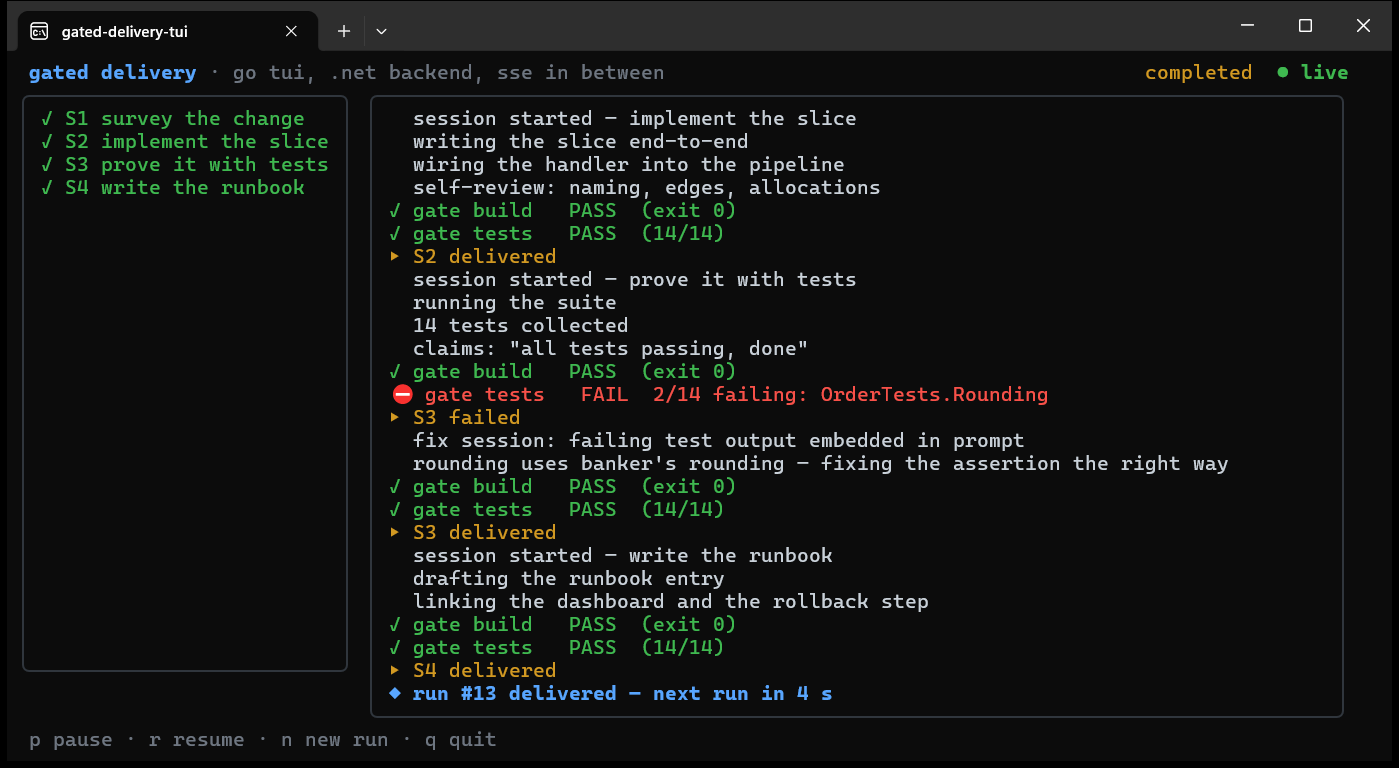
That’s it running — the red FAIL line is the scripted lying agent being
caught by its gate battery, and everything below it is the fix session
cleaning up. Now be cruel to it, because the cruelty demonstrates the
architecture:
kill the TUI mid-run — the backend doesn’t notice, and reattaching
repaints the full board from the replay ring. Press p and watch the
backend pause while the stream stays live — pausing is backend state, not
UI state; a second attached TUI shows it too. And when you want to see the
truth without any UI at all: curl -N http://127.0.0.1:5058/run/events.
The face is optional. The system is not.
What it costs, honestly#
Two toolchains in one repo, with the idiom tax that implies — a .NET engineer touching the face needs a day of Elm-architecture acclimatisation (it’s the good kind of weird). The wire contract needs the discipline any API needs: version it, tolerate unknown fields, never rename in place — the TUI treating unknown events as “something to display verbatim” has quietly absorbed several backend changes. TUI testing is thinner than web testing — Update-function unit tests are easy and good, “does it look right at 83×41” is still eyeballs. And SSE buys its simplicity by being one-way; if your UI’s commands are chatty and latency-sensitive, that’s the actual argument for WebSockets, so use them with a clear conscience.
None of these has made me miss the alternative — a browser dashboard for a
system whose entire audience lives in a terminal, or a C# TUI framework I’d
have to invent first. The AI tools made the terminal the serious UI surface
again. Meet it with the stack that’s serious about it: your backend where it
is, in .NET — and a face that’s a single binary, a pure fold, and one
curl-able stream away.
Runnable, attachable version:
go-tui-dotnet-backend
in blog-code — the .NET 10 SSE
backend and the Bubble Tea face, each half standalone. The real thing:
Conductor.